
Minecraft Seed Map: Complete Guide to Biomes, Structures & Seed Mapping (2026)
You load into your Minecraft world. You need a village, a stronghold, or maybe you are chasing an ancient city that took three real-world hours to find last time. You dig, wander and burn through Eye of Ender’s and still come up empty. Sound familiar? That is the exact problem millions of Minecraft players deal with every single session.
A Minecraft seed map solves all of that. Instead of wandering blindly, you open a map, enter your world seed, and instantly see every biome, structure, and point of interest laid out in front of you. Villages, strongholds, ancient cities, nether fortresses, all pinned with coordinates before you ever take a step.
Our seed map viewer is built specifically for this. It supports both Java and Bedrock editions, covers versions from 1.18 through 1.21, and is updated whenever Mojang releases a new update. Whether you are a complete beginner trying to find your first village or a speedrunner optimising a Nether route, this tool gives you the information you need, fast.
Minecraft Seed Map
Details
Datapacks
Drag a ZIP here or click
Image Settings
Grid Options
Select Version
Snapshot
Latest
Old
Preview
Latest
Old
Latest
Share Map
Seed
Image
Link
What Is a Minecraft Seed Map?
Every Minecraft world starts with a seed. That seed is a number, sometimes up to 20 digits long, that tells the game exactly how to build your world. Every mountain, every river, every village, every underground dungeon. All of it traces back to that seed number.
A Minecraft seed map is an online tool that takes your seed number and visualizes your world. You get a color-coded, overhead view of your entire world. Biomes displayed by color, structures marked with icons, and exact X/Z coordinates for anything you want to find. The whole world is visible in seconds, without loading the game.
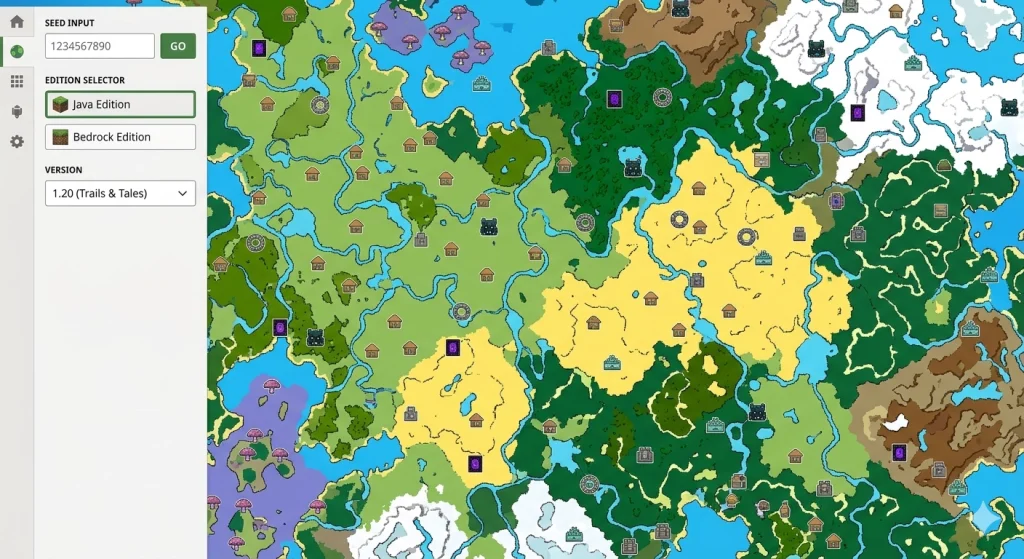
What information does a seed map show?
A good seed map gives you more than a rough layout. Here is what you can see:
Coordinates
Every structure comes with X and Z values you can punch into F3 or your in-game coordinate display and navigate straight to.
Terrain and elevation
The seed map shows terrain shading so you can read hills, cliffs, valleys, and flat build areas at a glance.
Dimensions
Switch between Overworld, Nether, and End. Each dimension renders separately with its own structure set.
Biomes
Every biome in your world is color-coded across the map. Plains, deserts, jungles, oceans, mushroom islands, and newer biomes like Cherry Grove and Pale Garden all show up distinctly.
Structures
Villages, strongholds, ancient cities, nether fortresses, bastions, end cities, dungeons, mansions, desert temples, and more. Each one is marked with an icon and is clickable for exact coordinates.
Why do players actually use it?
Minecraft worlds are enormous. Locating a stronghold by burning Eye of Ender can take 20 minutes. Searching for a mushroom island biome can take hours. A woodland mansion without a map? Good luck.
A seed map cuts all of that down to seconds. You type your seed, pick your version, and every structure in your world is right there. Players use it to plan survival worlds before starting, speedrunners use it to map Nether routes, builders use it to find flat land or dramatic terrain, and farm builders use it to locate slime chunks and ideal spawner positions.
It is not cheating. Your seed is your world’s information; you are just reading it more efficiently.
How to Use a Minecraft Seed Map Viewer: Step by Step

Select your game version
This is the most important step and the most commonly skipped. Select the specific Minecraft version that was used to generate your world. If you started your world on 1.20 and later upgraded to 1.21, use 1.20 when viewing areas generated in the early days of your world. The version determines how biomes and structures were placed.
Save your progress
Mark structures as completed using the checkbox in the pop-up window; the icon fades to show you have visited it. Create custom markers by right-clicking on the map and naming them. Generate a shareable link to send your seed map view to a friend.
How to Use a Minecraft Seed Map Viewer: Step by Step
Using our seed map viewer is simple once you know the steps. Here they are in order:
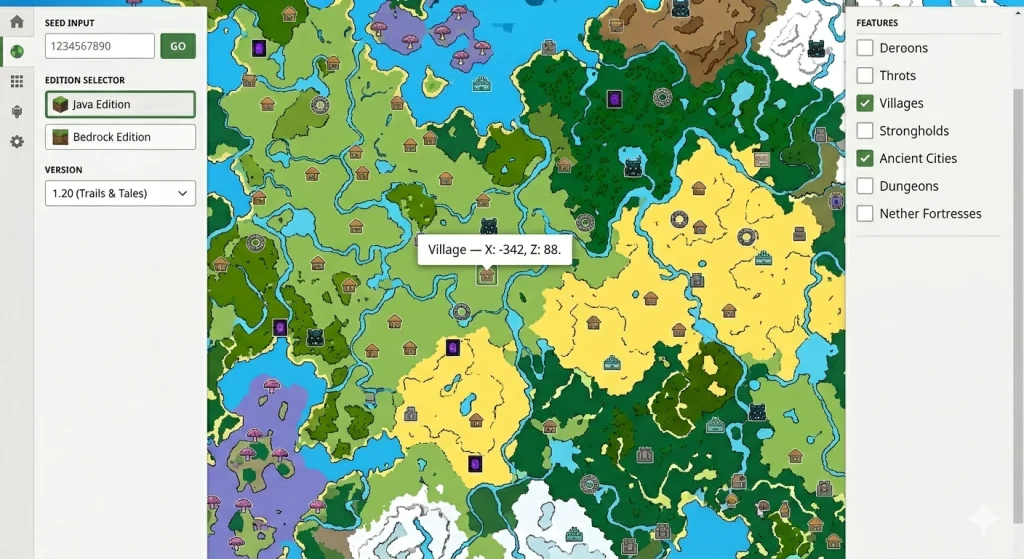
Enter your seed
Paste or type your seed number into the seed input field at the top of the tool. If your seed has a negative sign, include it. If it is a word seed, enter it exactly. The tool converts it to a number the same way Minecraft does.
Select your edition
Choose Java or Bedrock. This selection must match the edition you are actually playing. Using Java settings for a Bedrock world will produce wrong structure positions.
Choose your dimension
The map defaults to the Overworld. Use the dimension selector to switch to the Nether or End when you need structure locations in those dimensions.
Navigate the map
Zoom in and out with your scroll wheel or the on-screen buttons. Pan by clicking and dragging. Use the coordinate search box to jump directly to a specific X/Z location.
Enable structure filters
Open the Features panel and toggle which structure types you want to see. Showing everything at once can clutter the map. Turn on only what you are looking for: villages, strongholds and ancient cities.
Get structure coordinates
Click any structure icon on the map. A pop-up shows the exact X and Z coordinates. Copy those, open F3 in-game (or check your coordinates on console/mobile), and navigate directly.
How Does Seed Mapping in Minecraft Actually Work?
This is where things get genuinely interesting. Understanding the mechanics behind seed mapping helps you use the tool more effectively and trust its results with greater confidence.
How Minecraft uses a seed number
When you create a Minecraft world, the game feeds your seed into a pseudo-random number generator, or PRNG. This PRNG produces a long sequence of numbers that drives every single decision the game makes about your world’s layout. Where biomes begin and end. Where mountains form. Where each structure gets placed. Every tree, every ore vein, every cave opening.
The keyword here is pseudo-random. The algorithm is not truly random. It is deterministic, meaning the same input (your seed) always produces the exact same output (your world). Change even one digit of the seed, and you get a completely different world. Keep it identical, and you get the exact same world, every single time, on any device.
A seed map tool runs the same generation algorithm in your browser. It takes your seed, applies the same logic Minecraft uses, and produces the same world layout. No guessing, no approximation for the vast majority of structures. Pure calculation.
Why seed maps can reliably predict structure locations
Structures in Minecraft follow placement rules that are mathematically tied to the seed. Villages, for example, always generate within specific chunk grids. The game checks whether a village should exist in a given region by calculating a value that depends on the seed and the region’s coordinates. If the calculation returns yes, the village goes there. A seed map runs the same calculation.
This is why seed map accuracy is so high for most structures. The placement math is known and reproducible.
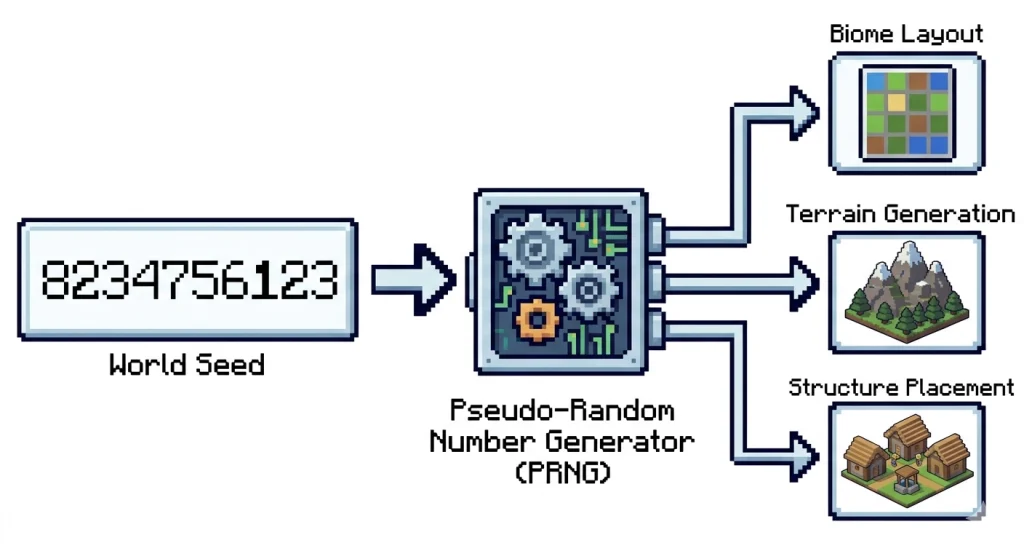
How to Find Your Minecraft World Seed
Before you can use any seed map, you need your seed. Here is exactly how to get it across every platform.
Java Edition
- This is the straightforward one. Open your world and type /seed in the chat box. Your world seed appears immediately in the chat. Copy it exactly, including the negative sign if it has one.
- If you want to find the seed without launching the game, navigate to your Minecraft saves folder. On Windows, it is %appdata%\.minecraft\saves. Find your world folder and open the level.dat file with an NBT editor. The seed is stored there under Data > WorldGenSettings > seed.
Bedrock Edition
- On PC, open your world and type /seed in chat. The seed appears the same way as Java.
- On console (PlayStation, Xbox, Nintendo Switch), go to your world settings from the pause menu. Scroll down to find the seed value. It is listed there without needing a command.
- On mobile (Minecraft PE), tap the pause button, go to Settings, then scroll to find the seed in your world options. Same information, slightly different navigation path.
- One important note for all Bedrock platforms: some servers and Realms restrict the /seed command for non-admin players. In that case, you need the world owner or server admin to retrieve and share it with you.
Server Worlds
- On a server where you have operator permissions, /seed works the same way. If you do not have operator access, you cannot retrieve the seed through commands.
- For server owners, the seed is stored in the server.properties file in your server’s root directory, listed as level-seed. If this field is blank, your server generated a random seed when it was first created, and you can find that seed in the level.dat file inside the world folder on the server.
- One thing worth stating clearly: a trailing space, a missing negative sign, or a single wrong digit will produce a completely different world on the seed map. Copy the seed carefully every time.
How to Read a Minecraft Seed Map
Knowing how to use the tool is one thing. Actually reading what the map shows you is another skill on its own.
Icons
Structure icons sit on top of the biome layer, and each type looks different. Villages appear as small house symbols, strongholds as circular markers, and ancient cities, nether fortresses, bastions, dungeons, and mansions each have their own distinct icons. When you’re zoomed out, most icons hide to keep things clean. Zoom back in, and they reappear. It’s intentional, and it makes a big difference for readability.
Coordinates
Every structure comes tagged with X and Z coordinates. X is East-West, Z is North-South. Since the map is top-down, Y isn’t shown, but each structure type has a known depth range. Strongholds sit between Y -40 and Y-30. Ancient cities emerged around Y -52. Mineshafts run roughly between Y 0 and Y 50. In Java, hit F3 to see your live coordinates. On Bedrock, switch them on in world settings. Get to the right X/Z, then dig within the known Y range.
Colors
Each biome gets its own color so you can read the map at a glance. Plains are light green, deserts run yellow-tan, oceans stay blue with deeper zones in darker shades, and jungles show up as rich dark green. Snowy biomes go white or pale grey, and mushroom fields stand out in pinkish-purple.
Hover over any zone, and the biome name pops up in the info panel. One thing to keep in mind: coastline edges don’t perfectly match in-game shorelines on worlds generated in version 1.18 and above. The biome IDs are accurate, just don’t expect the border lines to trace the exact water’s edge.
Accuracy Limitations
Surface structures like villages, desert temples, and shipwrecks are highly accurate. You’ll land right on them. Underground and partially buried structures are a bit less precise. Fossils, ruined portals, and trail ruins only show the center of their chunk, so the actual structure can be 10 to 20 blocks off from the marked spot.
Search the area rather than digging straight down. Also, villages and igloos occasionally show on the map but don’t fully generate in-game due to local terrain conflicts. It’s rare, but it happens, and it’s a Minecraft behavior, not a tool error.
Best Minecraft Seeds 2026: Java & Bedrock
These seeds are tested and verified for Minecraft 1.21.x. Each one includes the seed code, edition, and key coordinates so you can verify them on our seed map before loading them into your world.
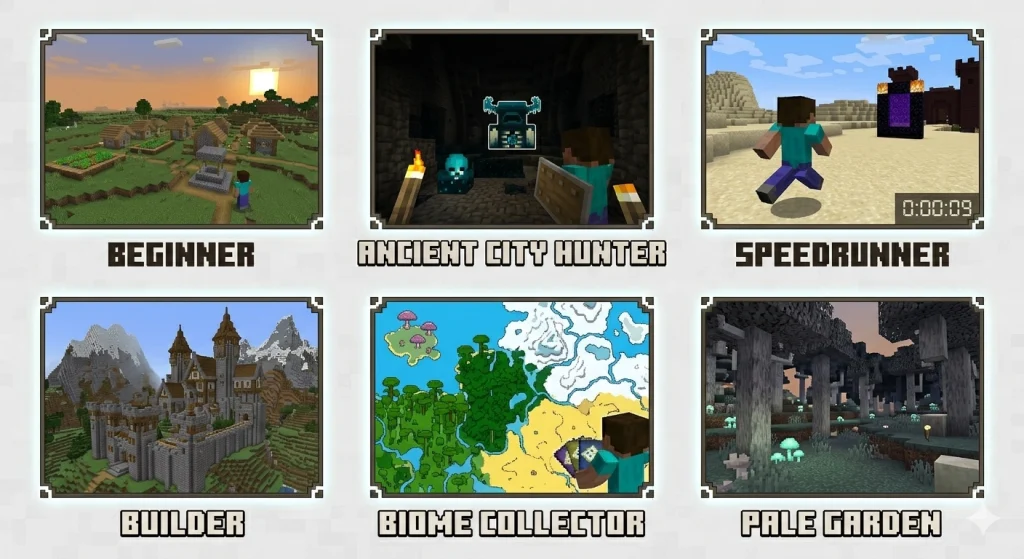
For Beginners
Starting strong in a new world makes a massive difference. The best beginner seeds put villages, food sources, and basic materials within walking distance of spawn.
Spawn lands you near a plains village with a ruined Nether portal in the same area. A mineshaft sits below the village. You have food, shelter, crafting resources, and an early path to the Nether all within the first 200 blocks of your start.
Three villages within 400 blocks of spawn across plains and savanna biomes. Multiple biomes are immediately accessible. Excellent for players who want variety and safety from day one.
For Ancient City Hunters
Ancient cities are the most sought-after post-1.19 structure. Deep underground, packed with loot, and sitting inside the Deep Dark biome. Finding one quickly is a goal for many players.
An ancient city sits at approximately X: -210, Y: -52, Z: -700. A village is nearby at the surface for early resources before you go underground. One of the most shared seeds for Deep Dark exploration.
Multiple ancient cities within 1,500 blocks of spawn. Strong choice for Bedrock players who want to tackle Deep Dark content without a lengthy search phase.
For Speedrunners
Speedrun seeds live or die on Stronghold placement, Nether routing, and how compact the critical structures are relative to spawn.
Stronghold is located within 1,000 blocks of spawn. Nether Fortress and Bastion Remnant sit within reasonable proximity to your likely Nether entry point. Clean routing potential with no extreme travel requirements.
The core principle for speedrun seed evaluation: open the seed in our seed map viewer, switch to the Nether dimension, and check how far the Fortress and Bastion are from coordinate 0,0 in the Nether. Then switch back to Overworld and check Stronghold distance. If all three are compact, the seed is viable.
For Builders
Builders need specific things: flat land for large projects, dramatic terrain for scenic builds, ocean access for ports and docks, or mountain faces for cliff-side structures.
Spawns near a large exposed mountain range with flat valleys adjacent. The Cherry Grove biome is accessible within 800 blocks. Natural amphitheater-like terrain that works exceptionally well for large castle or town builds.
Island spawn with ocean surrounding it and a lush cave visible from the surface. Excellent for ocean-based or island survival builds.
For Biome Collectors
These seeds compress maximum biome variety into the area nearest spawn, ideal for players who want to explore many biomes without extreme travel.
Over 15 distinct biomes within 2,000 blocks of spawn, including jungle, badlands, snowy slopes, and deep ocean. Among the most biome-dense seeds verified for 1.21.
For the Pale Garden Biome
The Pale Garden was added in 1.21.4. It is Minecraft’s newest biome, a grey-white forest with hanging pale moss, pale oak trees, and Creaking mobs that appear at night. Finding it near spawn is rare enough that dedicated seeds are worth knowing.
A Pale Garden biome adjacent to a plains village spawn. A ruined Nether portal sits nearby. This is exactly the kind of atmospheric, content-rich spawn that makes 1.21.4 exploration feel immediate.
Use our biome finder to verify Pale Garden locations for any seed before loading in.
Minecraft Seed Map; Java Edition vs Bedrock Edition
This is the section that causes more confusion than anything else in seed mapping. Understanding the differences between Java and Bedrock is critical for accurate results.
Since Minecraft version 1.18, terrain and biome generation have been shared between the Java and Bedrock editions. Enter the same seed on both, and you get the same mountain ranges, the same river systems, the same biome placement. That part matches.
Structures, however, do not match. Trees, grass, and decorative features do not match either. Java and Bedrock use different algorithms for placing structures within the world. A village that sits at X: 300, Z: -150 in Java will not be at that same location in Bedrock, even with the identical seed and version.
Feature | Java Edition | Bedrock Edition |
Biome placement | Matches across editions (1.18+) | Matches across editions (1.18+) |
Terrain layout | Matches across editions (1.18+) | Matches across editions (1.18+) |
Structure positions | Java-specific algorithm | Bedrock-specific algorithm |
Seed map accuracy | High, algorithms well documented | Moderate, some structures are less precise |
Spawn point prediction | Reliable | Less reliable |
Slime chunk calculation | Standard seed-based calculation | Different chunk math applies |
Cave biome generation | Matches across editions | Matches across editions |
Java Structure Finding accurate than Bedrock
The reason Java structure finding produces more precise results comes down to documentation. Java Edition is open to community reverse engineering and research. The exact algorithms used to place every structure type are well understood and have been verified through years of testing. Seed map tools can reproduce those calculations with high confidence.
Bedrock Edition’s structure placement algorithms are harder to analyze. Many Bedrock structure positions in seed map tools are derived from brute-force analysis, comparing known structure positions from actual gameplay and working backwards to determine the parameters. This produces good results for most structures but introduces a small margin of error, particularly for less common structures.
Mixed-version worlds
This is a specific edge case that trips up many players. If you started a world on Minecraft 1.19 and have since upgraded to 1.21, your world is a mixed-version world. Chunks you explored and loaded in 1.19 were generated by the 1.19 algorithm. New chunks you are exploring now are generated by 1.21.
On the seed map, you need to match the version to the region you are looking at. For areas you explored early in your world, use 1.19 settings. For newly generated areas at your current exploration frontier, use 1.21. The tool lets you switch versions, so you can cross-reference both views when planning routes into unexplored territory.
Minecraft Seed Map 1.21: Changes You Need to Know
Minecraft 1.21 introduced enough changes to world generation to warrant direct attention. If you are using a seed from 1.20 or earlier on a 1.21 seed map, or vice versa, you will see discrepancies.
Trial Chambers
Trial Chambers are a new structure in 1.21, underground and filled with mob spawners called Trial Spawners. They appear on modern seed maps as their own icon. Coordinate accuracy for Trial Chambers is solid on Java. Bedrock accuracy is reasonable but slightly less precise than Java, consistent with the general pattern for Bedrock structures. Use the stronghold finder alongside Trial Chamber locations since both structures can cluster in similar depth ranges.
Pale Garden Biome
Added in 1.21.4, the Pale Garden is a grey-white woodland biome where Creaking mobs spawn at night. It appears on seed maps only when you select version 1.21.4 or later. Select an earlier version, and it does not appear in the biome layer at all, because it did not exist in those versions.
Use our biome finder to locate Pale Garden biomes in any 1.21.4+ world.
Sulfur Caves
Sulfur Caves are an experimental feature currently in Bedrock preview builds as of early 2026. They are not present in stable release versions. Our tool shows experimental Sulfur Cave locations for Bedrock preview versions with a clearly marked experimental indicator. Do not expect these to match stable Bedrock worlds.
Critical reminder about version alignment
Every mismatch issue in seed mapping traces back to one thing: the version you selected on the map does not match the version that generated your world. This matters more with each major update because generation rules change.
Why Our Minecraft Seed Map Viewer Works Best
Knowing how to use the tool is one thing. Actually reading what the map shows you is another skill on its own.
No account, no install, no payment
Open the page, enter your seed and get your map. Works on desktop and mobile across all major browsers.
Always up to date
We update with every major and minor Minecraft release. New biomes, new structures, new generation rules, all added as fast as possible after each drop.
Accurate structure finding
Java structures are built on thoroughly researched generation algorithms. Bedrock models update continuously as new community data comes in.
No hidden limitations
Structures with higher uncertainty on Bedrock are clearly marked. You always know what to trust and what to double-check in-game.
Experimental features are labeled
Things like Sulfur Caves are flagged clearly so you know their current status before relying on them.
Your data stays on your device
Saved markers, custom labels, seed links, none of it touches external servers. Your world planning info is yours.
All Minecraft Structure Finders Complete Reference
Every major structure in Minecraft has a dedicated finder on our tool. Here is the full breakdown by dimension.
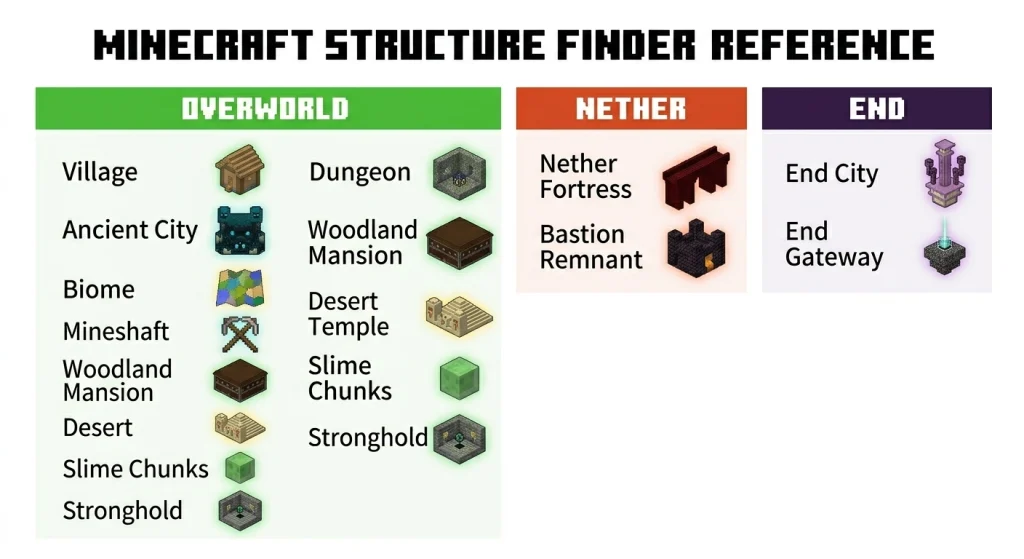
Overworld Structures
Starting strong in a new world makes a massive difference. The best beginner seeds put villages, food sources, and basic materials within walking distance of spawn.
can locate any biome in your world by color. Essential for hunting rare biomes like Mushroom Fields, Cherry Grove, Mangrove Swamp, and the Pale Garden. You can also use it to find cave biomes like Lush Caves and Dripstone Caves at the right depth ranges.
finds every village type across all biomes: plains, desert, savanna, taiga, and snowy villages. Each has its own architectural styles and trade opportunities. Beginners should always locate the nearest village before starting a survival world.
pinpoints Ancient Cities in Deep Dark biomes at around Y -52. These are the highest-risk, highest-reward structures in the game. Locating them before you dig down saves the Eye strain of listening for sculk sensors.
Dungeon Finder
locates mob spawners underground. Dungeons contain zombie, skeleton, or spider spawners and are situated at the center of a small stone room with chest loot.
Mineshaft Finder
finds abandoned mineshafts, including the Badlands variant that generates at the surface level inside mesa terrain. Mineshafts carry rails, chests, and cave spider spawners.
Desert Temple Finder
Surface structures with high coordinate accuracy. Desert temples contain four chests buried under a TNT trap. Excellent early-game loot in the right world.
Woodland Mansion Finder
tracks down the rarest Overworld structure. Woodland Mansions spawn extremely far from spawn in most worlds, easily 5,000 to 20,000 blocks out. A seed map saves hours of map-burning exploration.
Unlike every other structure on this list, slime chunks are not placed by a structure algorithm. They are determined by a mathematical calculation based on your world seed and the chunk’s grid position.
Strongholds contain the End Portal and are the gateway to fighting the Ender Dragon. They generate in rings around the world’s origin. Our stronghold finder gives you exact coordinates so you can walk directly to the nearest one without burning a single Eye of Ender.
Nether Structures
Nether Fortresses contain blaze spawners, nether wart, and the loot chests needed to progress through the game. Plan your Nether entry point relative to fortress locations before you step through the portal.
Bastion Remnant Finder
Bastions come in four types: Bridge, Hoglin Stables, Housing Units, and Treasure Room. The Treasure Room has the best loot, including Netherite scraps and ancient debris adjacent blocks. Identifying the Bastion type before entering completely changes your approach and risk level.
End Structures
End City Finder
End Cities are the source of Elytra and some of the best loot in the game. They generate on the outer islands of the End dimension, which is large and hard to navigate without a map.
End Gateway Finder
After defeating the Ender Dragon, End Gateways appear around the central island and teleport you to the outer islands. Understanding which Gateway is closest to an End City cluster completely changes the efficiency of the End dimension.
How to Fix Minecraft Seed Map Accuracy Issues
Wrong version
The map version must match the version that generated that part of your world. If you upgraded mid-world, switch versions depending on whether you’re checking old or newly explored areas.
Wrong edition
Java and Bedrock use different algorithms. Picking Java in a Bedrock world returns incorrect coordinates every time. Check this first.
Spaces in your seed
One extra space before or after your seed changes everything. Paste it into a plain text editor, clean it up, then enter it into the seed field.
Mods or data packs are active
Any mod that touches world generation makes vanilla seed maps useless for your world. You’ll need mod-specific tools instead.
Structure exists on the map but not in-game
Some structures pass the placement check but don’t physically build due to local terrain. Villages are the most common case. It’s a Minecraft thing, not a tool bug.
The bedrock spawn point is off
Spawn prediction on Bedrock has a higher margin of error. Find a structure you’ve already located in-game, verify your version and edition match, then navigate from that point instead of spawn.
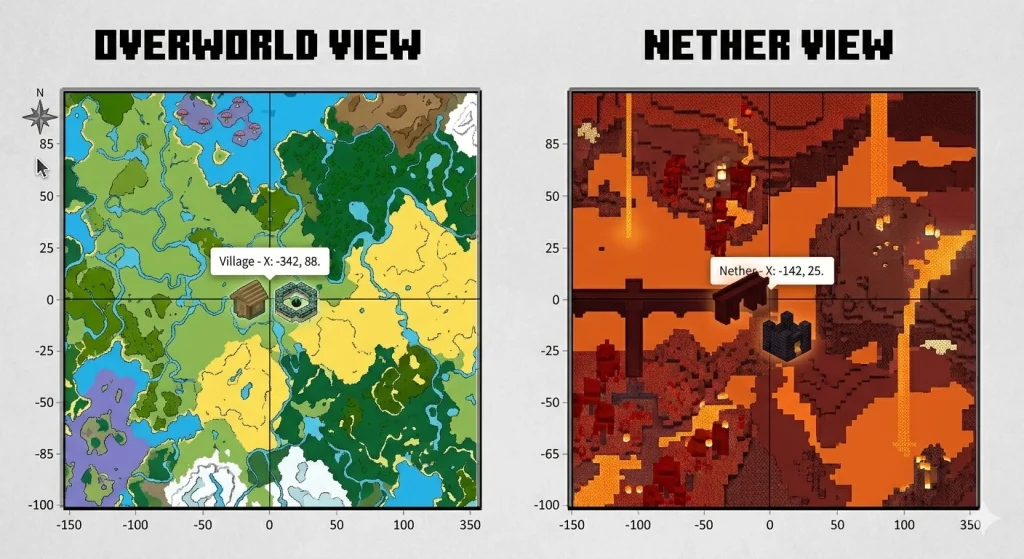
Tips for Choosing the Right World Using the Seed Map in Minecraft
- Hit Random repeatedly to browse world previews quickly; each one takes about 10 seconds to load.
- Look for at least two or three biomes within 500 blocks of spawn and a village no further than 800 blocks out.
- Check Stronghold distance early; under 1,500 blocks from spawn is ideal.
- Switch to the Nether view and aim for a fortress within 500 Nether blocks of your portal point.
- Always verify seeds from online sources in the seed map before using them; version mismatches are common.
- Look for structural clusters, such as a village near a stronghold or a bastion near a fortress; these make the best long-term worlds.
Frequently Asked Questions
Is using a Minecraft seed map considered cheating?
That is entirely up to you and your personal playstyle. The seed is factual information about your own world. Most players treat it as a planning tool. Speedrunners and technical players consider it essential.
Do seed maps work for all Minecraft versions?
Most modern seed map tools, including ours, support versions from 1.18 onwards. Some tools offer partial support for older versions, but accuracy decreases significantly for pre-1.18 worlds.
Why does my seed map not match my world?
The version you selected on the map does not match the version that generated your world. Edition mismatch is the second most common cause. Using Java settings for a Bedrock world.
Can I use a seed map on a multiplayer server?
Yes, as long as you know the seed. If you have operator permissions, use the /seed command. If not, you need the server admin to share the seed with you.
Do seed maps work on Minecraft PE and mobile?
Yes. Minecraft PE runs on Bedrock Edition. Select Bedrock in the edition settings, choose your version, and the tool works fully.
How accurate is a seed map for Bedrock Edition?
Biomes and terrain are highly accurate for Bedrock 1.18 and above. Structure positions are generally accurate but have a slightly higher margin of error than in Java Edition because Bedrock’s placement algorithms are less well-documented.
Does a seed map show where diamonds and ores are?
Standard seed maps focus on biomes and structures. Ore and diamond locations require a different type of tool that calculates ore vein positions from the seed.
Will my seed map still work after a Minecraft update?
Your seed map will always work for the version you select. Updating Minecraft does not change the seed map for existing world regions. New chunks you explore after updating will follow the new version’s generation rules. Use the version selector to switch between old- and new-generation parameters as you explore your world’s frontier.
What is the best seed for Minecraft in 2026?
The best seed depends entirely on what you want to do. For beginners, seeds with multiple villages near spawn like -7417157268905316998 (Java 1.21) are ideal. For Ancient City hunting, seed 1111111111111111111 delivers. For builders wanting dramatic terrain, -1617224717 is a strong pick.
Why do some structures on the seed map not exist in my world?
Some structures pass the generation placement check mathematically but fail to physically build in-game due to terrain conditions. Villages are the most common case. This happens infrequently but is a known game behavior across both editions.